A Mug3D alternative for 3D mug mockups
Upload your design and send the mug to your customer in 3D, with a link they open on their own phone. You can use the mockup to sell on every plan, including the free one.
Create a free mug mockup



When Mug3D is the better choice
Mug3D is a free mug editor that works in the browser. It is the better choice in these cases:
If the mug is for yourself, like a gift or to see how it looks before you order it. The Mug3D terms allow exactly this kind of personal use.
If you need the editor in German, French, Italian, Russian, Turkish, Polish, Finnish, Chinese or Japanese. Mug3D has 12 languages, and Rapid Mockup has three.
For selling, the Mug3D terms do not allow it: use is personal and non-commercial only.
If the mug is for yourself, like a gift or to see how it looks before you order it. The Mug3D terms allow exactly this kind of personal use.
If you need the editor in German, French, Italian, Russian, Turkish, Polish, Finnish, Chinese or Japanese. Mug3D has 12 languages, and Rapid Mockup has three.
For selling, the Mug3D terms do not allow it: use is personal and non-commercial only.
Rapid Mockup and Mug3D, feature by feature
| Feature | Rapid Mockup | Mug3D |
|---|---|---|
| Commercial use of the mockup | Yes, on every plan, including the free one | No, the terms allow personal use only |
| 3D link your customer opens on their phone | Yes | No, the site has no sharing option |
| Video of the mug spinning | Yes, in MP4 up to 4K | Yes, in WEBM |
| 3D mug in the editor | Yes | Yes |
| Image download | High-resolution PNG | PNG |
| Models in the catalog | More than 350 mockups, from mugs to T-shirts | 13 mug, cup and can models |
| Free plan | Yes, with 30 mockups, 10 videos and 5 3D links per month | Yes, for personal use only |
| Where it runs | In the browser | In the browser |
Checked on November 16, 2026 on the Mug3D website and its terms of use.
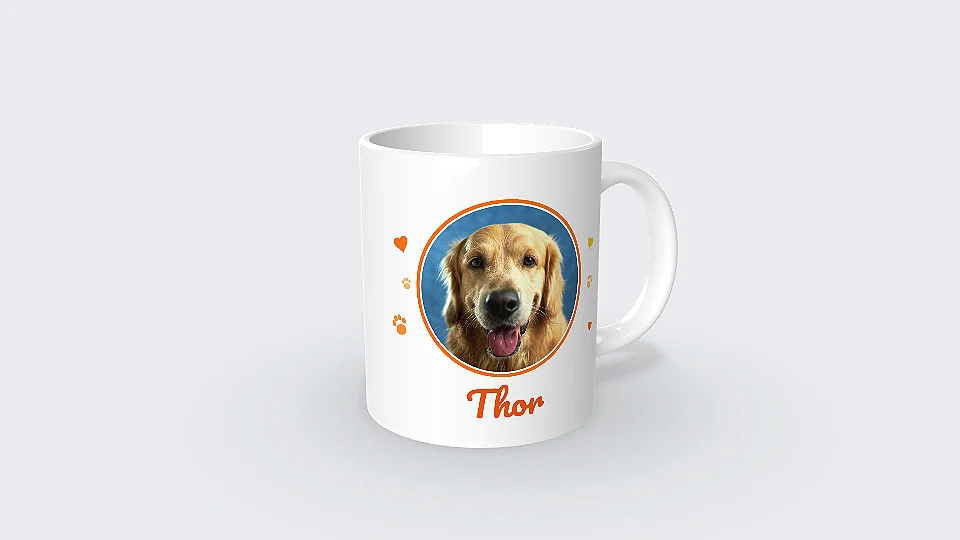
Send the mug to your customer in 3D
The 3D link opens in the browser on any phone, with nothing to install. Just send it by text or WhatsApp, and your customer sees how the mug will look from every side.
Create the 3D mug link
“I just tried it: I sent the link to a customer and she loved the experience. She said she had never seen anything like it!”
 Kanekadas Brindes@kanekadasbrindes
Video of the mug spinning in MP4 (great for reels)
The video comes out in MP4 up to 4K, ready to post to Instagram Stories and Reels.
Rapid Mockup mug models


How to bring the design you already use
-
1
Get your mug design ready
Use the same PNG or JPG file you uploaded to Mug3D.
-
2
Open the mug and upload the design
Click create mockup. The mug opens in 3D in your browser, and you adjust the position and size of the design.
-
3
Share in 3D or download
Send the 3D link by text or WhatsApp, or download the image or the video.
1. Get your mug design ready
What's free and what a paid plan adds
Just create a free account to make 30 mockups, 10 videos and 5 3D links per month, without the watermark. Paid plans raise these limits and unlock every mockup in the catalog. Prices are in the plans section.
Questions about Mug3D and Rapid Mockup
Is Mug3D free?
Yes. The Mug3D website says the editor is free, and it has no pricing page. Its terms allow you to use what you create for personal, non-commercial purposes only.
Can I use a Rapid Mockup mockup to sell?
Yes. The terms allow you to use the mockup to sell on every plan, including the free one: in your catalog, your online store, on social media and to send to your customer. What you can't do is resell the mockup as a service.
Do I need to install anything?
No. Rapid Mockup works in the browser, and the 3D link opens in the browser on your customer's phone.
How do I send the mockup for my customer to approve?
Create the 3D link and send it by text or WhatsApp. It opens in the phone's browser, with nothing to install, and on the free plan it stays online for 30 days.
Are there heart handle mugs, beer mugs and cans?
Yes. The catalog has heart handle mugs, beer mugs, mugs with a spoon, cups with saucers, drink cans and tumblers, among others.
Do I need an account to make the mockup?
You don't need one to try it. The mug opens right away and the mockup shows the Rapid Mockup watermark. To download it without the watermark, just create a free account.
What other tools make 3D mockups?
We compared Rapid Mockup with Pacdora, Placeit, Canva and Printful in the list of the best 3D mockup generators, with a table of each tool's features.
Mug3D is a trademark of its owner. Rapid Mockup has no affiliation with Mug3D, and the information about it was checked on its official website on November 16, 2026.
Send your next mug quote with a 3D mockup
Upload your design and see how the mug will look. Your first mockup is ready in under a minute.
Create a mug mockup